Note 028Automation3 min read
WhatsApp Business API in Qatar: a plain guide
What the WhatsApp Business API is, how it differs from the app, the rules Meta sets, what a business in Qatar can build on it, and how to start.
In Qatar many customers write to a business on WhatsApp first, and a busy line soon outgrows a phone on a desk. The WhatsApp Business API, which Meta now calls the WhatsApp Business Platform, is how a business answers at scale: several people on one number, an assistant that answers at any hour, and messages sent from its own systems. This guide explains what it is, the rules that come with it, and how to start.
The app and the platform
The WhatsApp Business app runs on a phone and suits a small shop: one person, one device. The platform has no app of its own. The line is connected to Meta's business platform, and the business answers it from its own panel or system, with as many people as it needs and an assistant beside them.
The rules Meta sets
- A customer must agree to hear from the business before it writes to them first
- For 24 hours after a customer's last message, the business can reply freely
- Outside that window it can send only templates: messages Meta has reviewed and approved in advance
- The name customers see on the line is reviewed by Meta too
The rules protect the customer, and they protect the number: a line that keeps to them stays in good standing. That is why we build only on Meta's approved route, as an approved Meta Tech Provider.
What a business builds on it
- An assistant that answers the questions it is asked every day, in the business's own words
- Bookings and confirmations, with buttons the customer taps instead of typing
- Notices sent from its systems: an order on its way, an appointment tomorrow, an invoice ready
- A team inbox where people take over from the assistant and hand back
- Every conversation kept with the customer's record
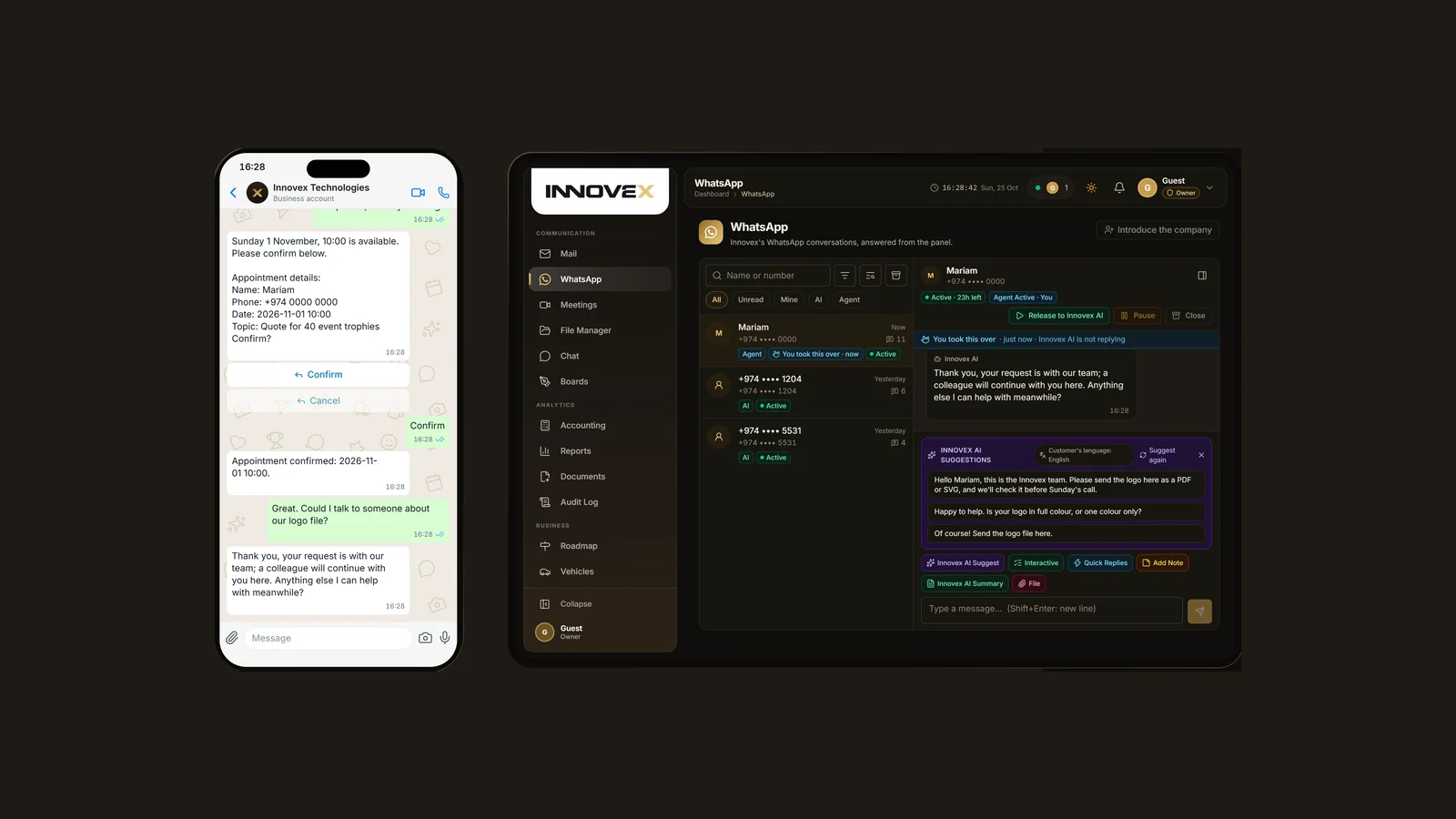
The picture is our own line with its panel: the assistant has booked a call, the customer asked for a person, and the team took over with the assistant's drafts ready. You can try the same conversation yourself on our social media automation page.
When a person takes over
An assistant should know where its knowledge ends. When a question needs a person, the conversation passes to the team with everything said so far, and it goes back to the assistant when they are done. Our note on answering WhatsApp automatically goes into what can be handed over.
What it costs to run
Meta charges for messages by type and by country, and it changes its rates from time to time, so the quote sets out what applies to the way your line will be used, alongside what it takes to build.
How to start in Qatar
- The number for the line: a new one, or the one your customers already know, moved to the platform
- The name customers will see, for Meta to approve
- The questions you are asked most, and how you answer them
- The messages you want to send first, to become templates
- Who on your team takes over, and when
Send it through the contact page or on WhatsApp: every enquiry is answered the same working day, and the quote says what it takes and how long it runs.
The same approach works on Instagram and Facebook; our note on Instagram and Facebook replies covers them.
Follow the studio
The work in these notes, as it is made: pieces off the printers, systems going live.